
Lucky Imaging, Finished in One Program
Planet Engine turns a planetary, lunar or solar video into one sharp image. It picks the best frames and combines them with Planet Engine’s advanced stacking: more detail and less residual seeing, all in one program. Then you sharpen and grade the result live, next to the image.
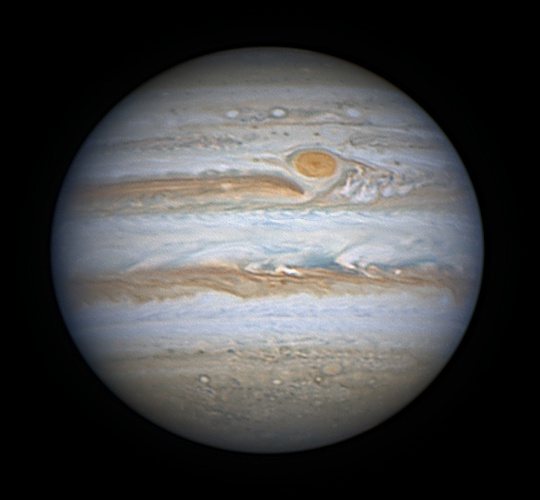
Jupiter and the Great Red Spot from a single video. Video and processing: Cristian Fattinnanzi · Planet Engine.
How it Works
Turbulence does not blur every frame, nor every part of a frame, in the same way. A classic stack copes with only part of it; Planet Engine’s advanced stacking gives more detail and less residual seeing. Each feature below says whether it is in the Free edition or in Pro.
Frame selection Free
Every frame gets a sharpness score at the scale of real detail, not of noise. Draw the quality graph when you want it, then drag its lines to pick the range of the video and the share of frames to stack (half of them by default).
Advanced stacking Free
A reference is built from the best frames of the central part of the video, then Planet Engine’s advanced stacking combines the frames: more detail and less residual seeing than a classic stack. The Quality menu sets how far it goes: higher quality, more detail, longer time. The stack can also be enlarged 1.5× or 2× to recover detail finer than the camera pixels.
Local selection Free
More detail on Jupiter and Mars; on Saturn, where it would only add noise, it turns itself off.
Moons aligned too Pro
The moons of Jupiter and Saturn move on their own and are tracked one by one, so Titan or the Galilean moons come out round and sharp instead of smeared (Pro). The Moons switch, which circles every moon found in the stack, is in the Free edition too.
Planets, Moon and Sun Free Pro: Sun by zone
Planets are found and centred by themselves, or the whole frame is kept. Lunar and solar surfaces, which fill the field, are tracked from one frame to the next and stacked right to the edges. The Sun can be processed in Free too, with filters on the whole image. Pro adds filters and colours for each zone (disc, prominences, filaments, spots, faculae), the negative with a sky of any colour that leaves the prominences alone, limb darkening and the disc halo, and the zones shown over the image.
Derotation Pro
Jupiter turns once every ten hours, so a long video smears its detail. Derotation compensates the rotation of Jupiter and Saturn, using the times in the SER or the AVI, and stays off when it does not help.
Colours in their place Free
While stacking, the red, green and blue channels are aligned to each other to remove the coloured edges of atmospheric dispersion. Already stacked images can have their channels aligned with one button too.
Mono cameras and filters Free
Drop the R, G, B (and L) videos of a filter session together: each one is stacked with the same care and the channels are combined into one colour image.
See the difference Free
After stacking, switch the view to Best frame, the single sharpest frame of the video, or to Original video (frames), and compare them with the finished stack.
Multistack Pro
How many frames should you stack? Tick a few percentages, say 30, 50 and 70%, and one run gives one stack for each, with the same settings, to compare with one click. It takes about as long as the largest stack alone.
Parameters and presets Free
Save parameters writes a small file next to the video: reopening the same video brings back every adjustment, curves included. It never overwrites without asking. Presets are whole sets of adjustments to try with one click and keep under your own names.
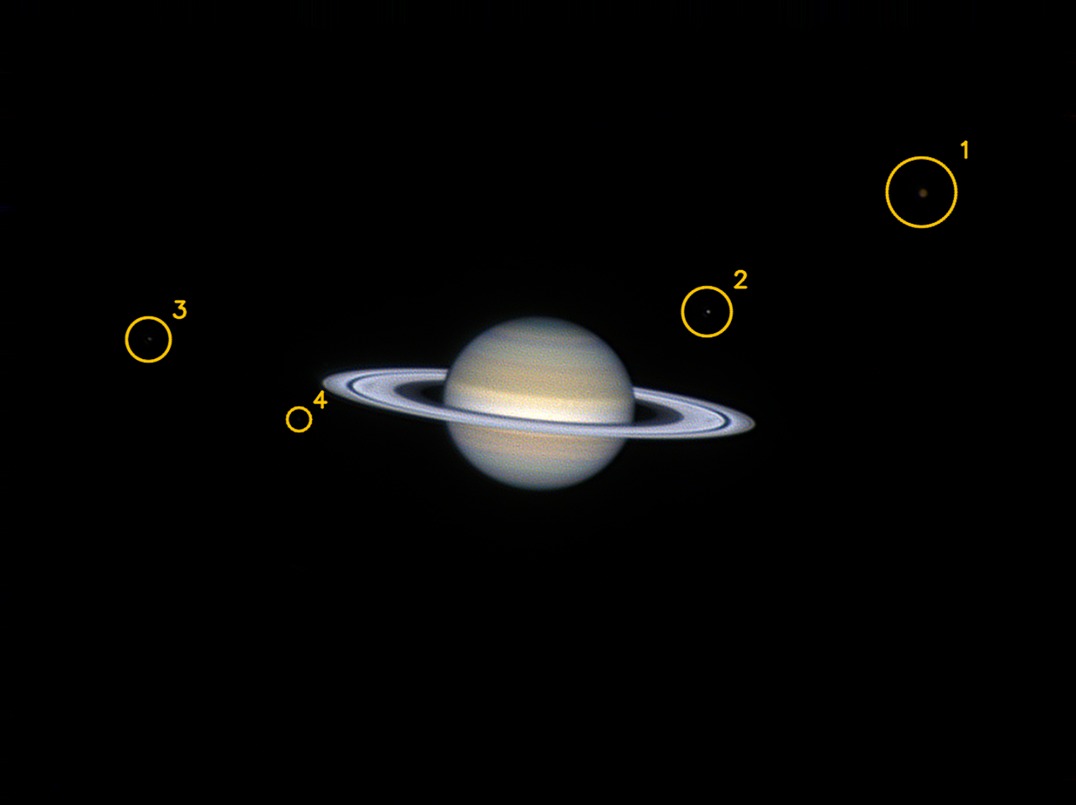
Saturn and four of its moons, stacked on the whole frame: each moon is aligned on its own, and the Moons switch circles them (on screen only, never in the saved files). Video by Cristian Fattinnanzi.
Everything Next to the Image
Stacking on the left, sharpening and colour on both sides of the result, log, saving and the measured result below. Every change to the sharpening, colour or curves shows up at once.
Live sharpening Free
Wavelets on five scales, each pushed up to 200, unsharp mask and a noise reduction that cleans every scale before boosting it, the same on bright and dark areas. Optionally on the luminance only, so no coloured fringes, and with the limb protected from bright rims and dark halos. A click on any slider’s knob, or the W key, switches that setting off and on, to see exactly what it adds.
Deconvolution and Wiener Free Pro: Wiener
Richardson-Lucy deconvolution up to 200 iterations, in Free too, to give back the sharpness the telescope and the air took away. Pro adds the Wiener filter, the Denoise Engine and the final touches: overall Sharpening, Smooth limb against the saw-tooth disc edge, Protect the limb and Colour blur.
Colour, tone and curves Free
Saturation, midtones, contrast and normalisation beside the image, with an RGB histogram and the colour cast. Curves with black point, white point and extra points for R, G, B and a light curve that never shifts the colours. Or switch to Lab: curve the light without touching the colour, and blur the colour noise without losing any detail.
Stacking on the GPU Pro
The heavy part of Planet Engine’s advanced stacking runs on the GPU: NVIDIA with CUDA, Intel and AMD with OpenCL. A 3-minute Jupiter video goes from 51 to 22 seconds with a desktop RTX 4080. The result is the same as on the processor, where everything runs in the Free edition.
Captions ready to share Pro
Save image… can add the capture data: object, UT date and time of the central instant, central meridians, telescope, camera and filter, focal length and scale, frames stacked, observer and place. In Free every saved image carries the Planet Engine logo at the top right (a FITS never does); in Pro you decide about the logo.
16-bit TIFF and PNG Free
The stack is saved as an uncompressed 16-bit TIFF, ready for your favourite tools (RegiStax included), and the finished image as PNG. Already have a stack? Open the TIFF, PNG, FITS, JPEG or BMP (also from AutoStakkert or Siril) and it goes straight to sharpening and colour.
Look closely Free
The mouse wheel zooms in steps that always stop at 100%, keeping the point under the cursor still. Hold the right button to move around the enlarged image. Every change can be undone (Ctrl+Z) and redone (Ctrl+Y).
Six languages Free
English, Italiano, Deutsch, Français, Español and Português. The interface follows the language of Windows and can be switched at any time with the ⚙ button at the top right.
Interface colour Free
The accent of sliders, check boxes and the three essential buttons follows Windows, or choose orange, blue, green, your own colour, or red for the night: it does not dazzle eyes adapted to the dark.
Gallery
Every image here is a single video stacked by Planet Engine. Click to enlarge.
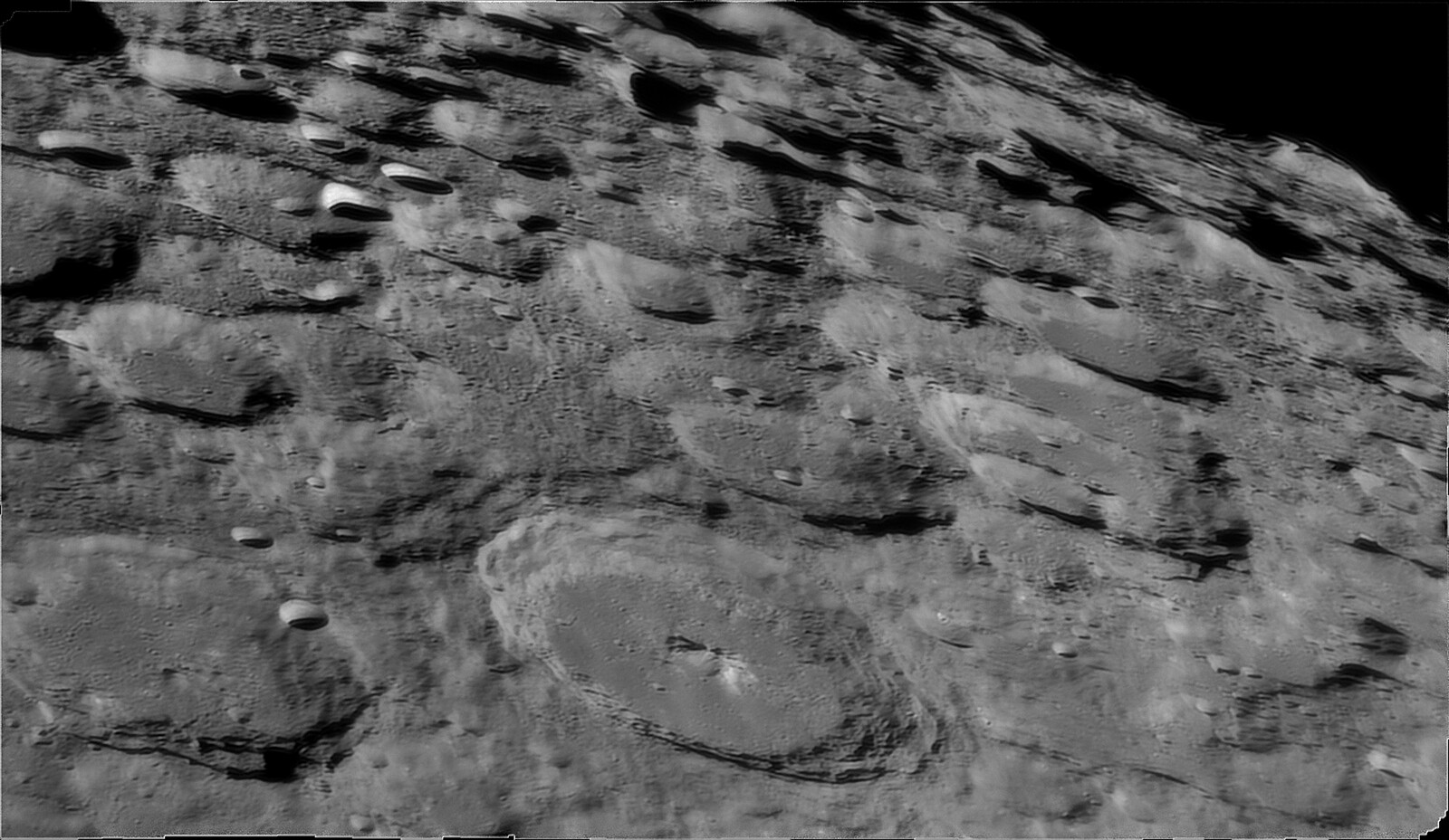
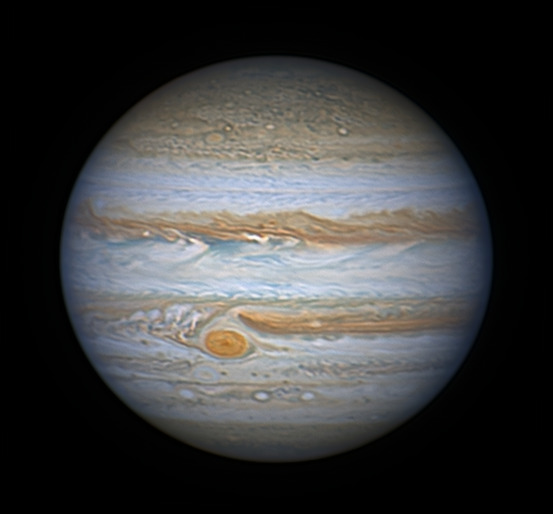
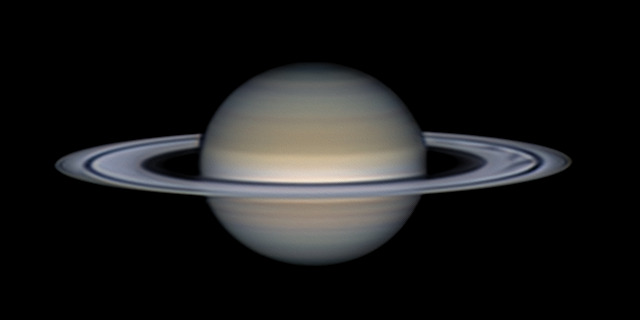
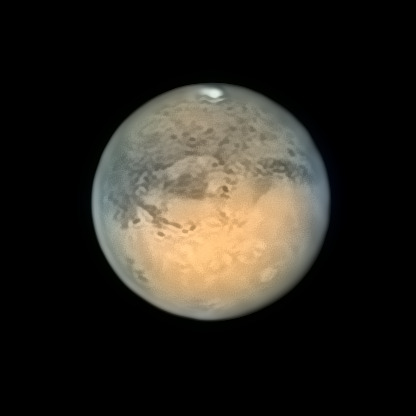
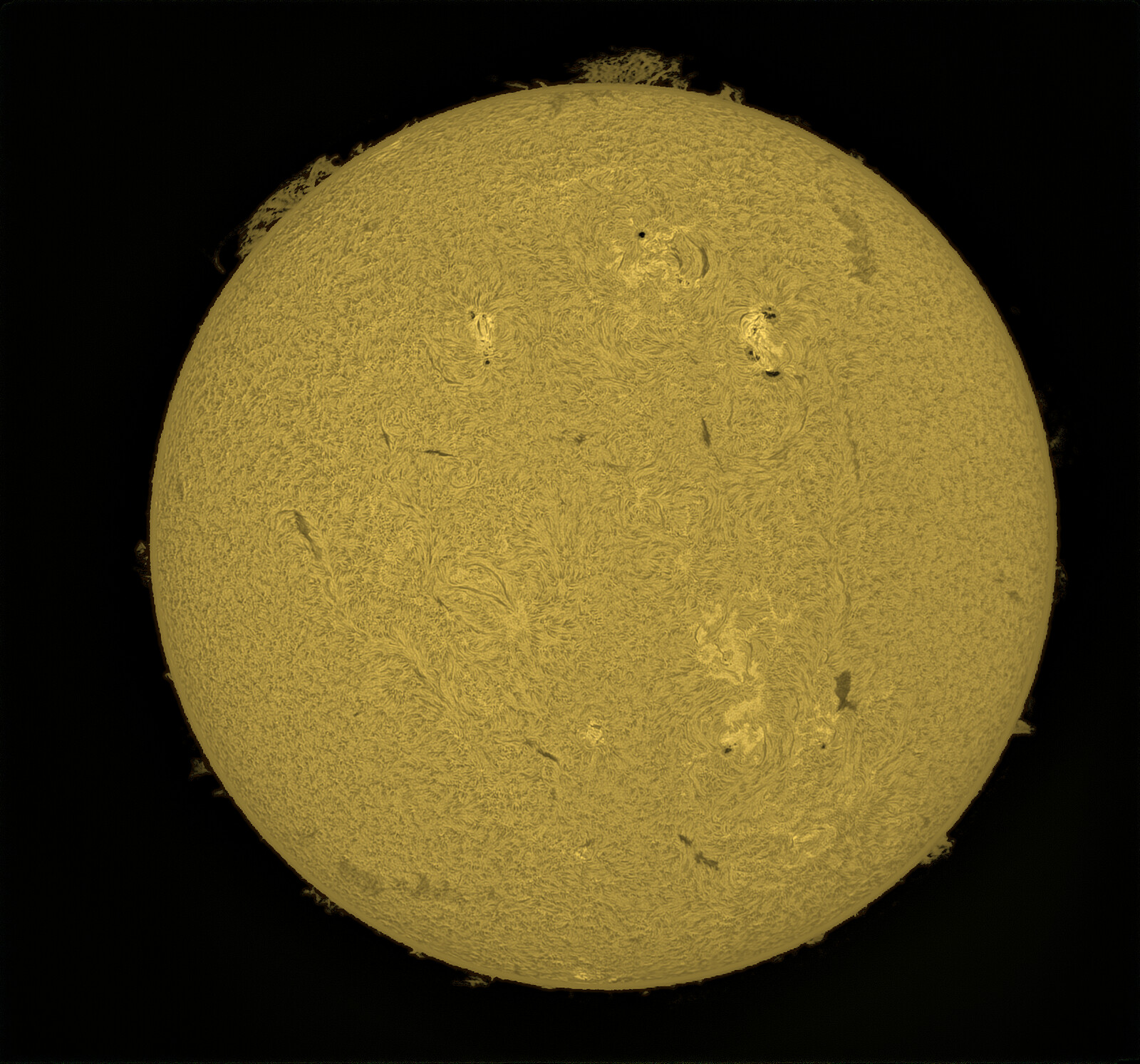
Images: Paolo Baldoni (Moon, Sun), Cristian Fattinnanzi (Jupiter, Saturn, Mars; Mars finished by Paolo Baldoni). Stacking and processing: Planet Engine.
Free and Pro
Planet Engine will come in two editions. Free, for everyone, already does advanced stacking of planets, Moon and Sun and finishes the image, deconvolution and presets included. Pro adds Auto Optimize, the Denoise Engine, the Sun by zone, the GPU and the tools for the last bit of detail.
| Feature | Free | Pro |
|---|---|---|
| Quality analysis and frame selection | Yes | Yes |
| Advanced stacking of planets, Moon and Sun, Normal quality, stack enlargement, RGB channels aligned while stacking | Yes | Yes |
| Deconvolution, unsharp mask, multiscale detail, classic noise reduction | Yes | Yes |
| Saturation, midtones, contrast, hue, colour cast removal, levels (black, midtones, white), RGB and Lab curves | Yes | Yes |
| RGB channel alignment of an already stacked image | Yes | Yes |
| Parameters and presets | Yes | Yes |
| Sun: filters on the whole image («Adjust: All») | Yes | Yes |
| Saving as 16-bit TIFF, PNG and FITS | Yes | Yes |
| Names of the Moon’s craters, seas and mountains | up to 3 | all |
| Planet Engine logo on saved images (PNG, JPG, TIFF; never on FITS) | top right | No |
| High and Maximum quality | No | Yes |
| Multistack | No | Yes |
| Derotation | No | Yes |
| Moons aligned one by one | No | Yes |
| Auto Optimize and Batch Auto-Optimize (every video in a folder) | No | Yes |
| GPU computing (CUDA, OpenCL) | No | Yes |
| Wiener filter | No | Yes |
| Denoise Engine | No | Yes |
| Final touches: overall sharpening, smooth limb, limb protection, colour blur | No | Yes |
| Contrast by scale | No | Yes |
| Full Sun mode: filters and colours per zone (disc, prominences, filaments, spots, faculae), negative, limb darkening and halo, zone overlay | No | Yes |
| Automatic caption with the capture data | No | Yes |
| Detachable preview, for a second monitor | No | Yes |
| Automatic saving of the stack and parameters | No | Yes |
| Try Pro free for 15 days (no e-mail needed, back to Free by itself) | 15 days | — |
Free Free
For everyone, no time limit.
Free and Pro are the same program. Already have the Pro? Download it here: your licence stays active.
Version 0.89.3 for Windows, 0.89 for Mac and Linux. One program: Free forever, with a 15-day Pro trial.
GPU computing: for now NVIDIA (CUDA) on Windows and Linux; on the Mac the Denoise Engine uses Metal. With other graphics cards Planet Engine runs on the processor. AMD support is coming as soon as possible.
Linux: AppImage, needs an up-to-date distribution (glibc 2.43 or newer).
Already have the Pro? Download the new version with the buttons on the left (same program): your licence stays active.
Pro Pro
Try Pro free for 15 days: every feature, no e-mail needed. When the trial ends, Planet Engine goes back to Free by itself. Launch price: €69 + VAT until 30 November, then €99 + VAT.
Pay once, keep it forever. The Pro you buy is yours, with every update of version 1. When version 2 comes, you get the upgrade at a discount, or you keep using your version 1.
Buy Pro — €84 VAT includedPayment with PayPal: choose “goods and services” and write in the note the e-mail you will activate Pro with. We register your licence for that e-mail; in the program you activate it from ⚙ › Licence…
Planet Engine goes online only for the licence, to check for updates and for anonymous usage statistics. It sends an anonymous computer code, the version, the operating system and the program’s fingerprint, which is used to recognise modified copies; only the approximate city is worked out from the internet address. It never sends your images, your videos, your files or your name. The trial and Pro activation need internet; after that you can also use it on a computer that is offline.
Details
Windows 10 and 11, macOS and Linux
64-bit Windows 10 / 11, Macs with Apple Silicon (M1–M5) and Linux x64: each version is a single file with everything inside.
CUDA and OpenCL GPUs
NVIDIA cards through CUDA, AMD and Intel cards (integrated ones too, if recent enough) through OpenCL, in the Pro edition. No suitable GPU? Everything runs on the processor, with the same result.
SER and AVI
The usual capture formats of planetary cameras, mono or colour. MOV, MP4, MKV and compressed AVI open directly, with the decoder that comes with the program.
Nothing to install
Unzip it anywhere and start PlanetEngine.exe. Drag a video onto the window, or click the empty viewer to choose one.
Thanks
Planet Engine grew out of the ideas of three astrophotographers: Renato Tarabella, Cristian Fattinnanzi and Paolo Baldoni. Cristian and Paolo ran it against AutoStakkert, RegiStax and AstroSurface on their own videos, and asked, rightly, for many of the features you find here. Thanks also to everyone who reports bugs and ideas on Discord.
Stay in Touch
Results, questions and ideas are welcome on Discord.
Join the Planet Engine Discordrenato.tarabella@gmail.com