Giocare online con un amicoPlaying online with a friend
Uno dei due crea una stanza, l'altro ci entra: la partita parte da sola. Il server è quello di Goriziana, non serve aprire porte sul router.
One of you creates a room, the other joins it: the game starts by itself. The server is Goriziana's own, no router ports to open.
Prima di cominciareBefore you start
- Tutti e due con la stessa versione di Goriziana (si vede nel titolo della finestra, per esempio 0.2.4).
- Tutti e due con la licenza attivata (la mail dell'invito).
- Il computer collegato a internet.
- Both with the same version of Goriziana (shown in the window title, for example 0.2.4).
- Both with an activated license (the invitation email).
- A computer connected to the internet.
Va bene tra sistemi diversiWorks across systems
Windows contro Mac, Mac contro Linux: la fisica dà gli stessi identici tiri su ogni computer.
Windows against Mac, Mac against Linux: the physics gives exactly the same shots on every computer.
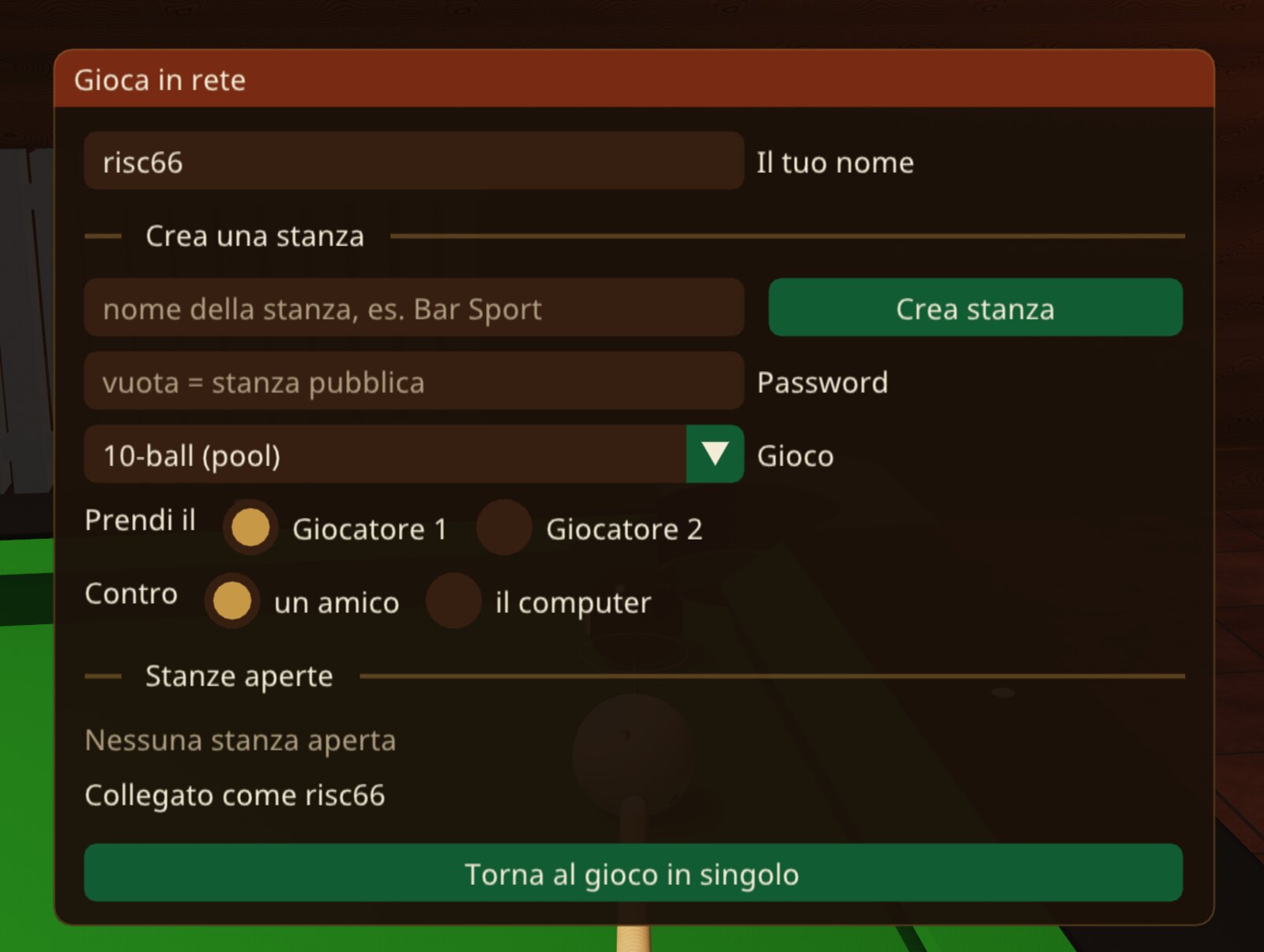
Chi crea la stanzaThe one who creates the room
Apri la Nuova partita
All'avvio del gioco c'è già la pagina Nuova partita. Se stai giocando, premi F10 e scegli Nuova partita.
Scegli Gioca in rete
Premi Gioca in rete. In alto scrivi il nome con cui ti vedrà l'amico, nel campo Il tuo nome.
Dai un nome alla stanza
Sotto Crea una stanza scrivi un nome, per esempio Bar Sport. Se vuoi che entri solo il tuo amico, metti una Password e diglela; vuota, la stanza è pubblica.
Scegli il gioco e la bilia
Nella tendina Gioco scegli cosa giocare (Goriziana, Italiana, pool...). Con Prendi il scegli il colore della tua bilia, e lascia Contro: un amico.
Crea la stanza e aspetta
Premi Crea stanza. Il gioco scrive Aspetti l'avversario: appena il tuo amico entra, la partita parte da sola.
Chi entraThe one who joins
Apri Gioca in rete
Come sopra: Nuova partita, poi Gioca in rete, e scrivi il tuo nome.
Trova la stanza
Sotto Stanze aperte compare la stanza del tuo amico, con scritto aspetta un avversario. L'elenco si aggiorna da solo.
Entra e gioca
Se la stanza è (privata), scrivi la password nel campo in fondo all'elenco. Poi premi Entra e gioca: si comincia.
Open New game
When the game starts the New game page is already open. While playing, press F10 and choose New game.
Choose Play online
Press Play online. At the top type the name your friend will see, in Your name.
Name the room
Under Create a room type a name, for example Bar Sport. To let in only your friend, set a Password and tell it to them; left empty, the room is public.
Pick the game and your ball
In the Game list choose what to play. With Take choose your ball, and leave Against: a friend.
Create the room and wait
Press Create room. The game says it is waiting for the opponent: as soon as your friend joins, the game starts.
Your friend opens Play online
Same as above: New game, then Play online, and their name.
Finds the room
Under Open rooms your room shows up as waiting for an opponent. The list updates by itself.
Join and play
If the room is (private), type the password in the field below the list. Then press Join and play.
Durante la partitaDuring the game
- Chi non gioca può entrare con Guarda e mettersi in fila per la partita dopo.
- A fine partita c'è Rivincita.
- Se cade la connessione, il gioco riprova da solo e la partita riprende.
- Per uscire: Esci dalla partita in rete.
- Others can join with Watch and queue up for the next game.
- At the end there is Rematch.
- If the connection drops, the game retries by itself and the match resumes.
- To leave: Leave the online game.
Se qualcosa non vaIf something goes wrong
- Server non raggiungibile: controlla la connessione o un firewall che blocca Goriziana.
- Serve la stessa versione: uno dei due ha un Goriziana più vecchio, riscaricalo da questa pagina.
- La stanza non compare: controlla di aver scritto bene il nome e aspetta qualche secondo.
- Server not reachable: check the connection or a firewall blocking Goriziana.
- Same version needed: one of you has an older Goriziana, download it again from this site.
- The room does not show up: check the name and wait a few seconds.