
Spline booleans without the hierarchy mess.
SplinesMask
A parametric SplineMask manager for Cinema 4D. Combine, subtract, intersect and divide multiple splines from a single, clean panel — no nested hierarchies needed.
Why SplinesMask
Flat list, not nested chaos
Cinema 4D's stock SplineMask only takes two children at a time. Boolean three or four shapes and you're stuck nesting SplineMasks inside SplineMasks. SplinesMask flattens it all into one ordered list.
Per-spline control
Each spline in the list has its own boolean mode: Union, A subtract B, B subtract A, Intersect. Toggle, reorder, swap mode at any time.
Works with anything
Primitive splines, text splines, MoGraph cloners, generators — anything that produces a spline. Drop it in the list and it just works.
Features
Unlimited splines per mask
Add as many splines as you need to a single SplinesMask object. No artificial limit, no nested hierarchies.
Four boolean modes
Union, A subtract B, B subtract A, and Intersect — assignable per spline, with the order of operations defined by the list.
Axis Mode
Choose the working plane: XY (along Z), XZ (along Y), or YZ (along X). The booleans are computed on the chosen plane.
Drag, drop, eyedropper
Add splines to the list by drag & drop or with the eyedropper. Toggle them on/off without removing them from the list.
Procedural & non-destructive
Source splines stay editable. Change their shape, parameters or position — the SplinesMask updates live.
Cross-platform
Pure Python, no native dependencies. Same plugin file works on Windows and macOS.
How it works
One SplinesMask object replaces a tower of nested SplineMasks. Add splines to the list, assign each one a boolean mode, and place the SplinesMask under any generator that takes a spline — Extrude, Sweep, Loft, MoSpline, anything.
From three nested objects to one
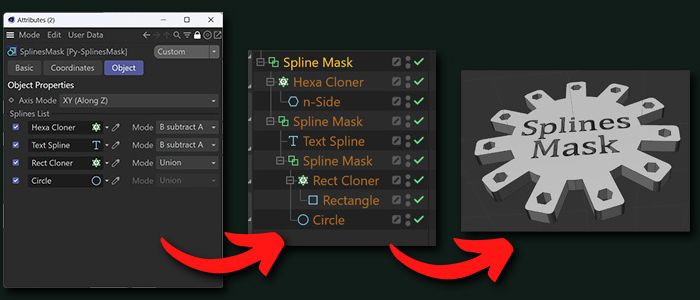
The image on the left shows what it takes to boolean four splines with the stock Cinema 4D SplineMask: three SplineMask objects nested inside one another, with the splines distributed across them in a specific order.
SplinesMask collapses all that into a single object with a flat list. Same result on the right (the cogwheel-shaped logo with cut-outs and embossed text), one fourth of the clutter in the Object Manager.
Clean Object Manager
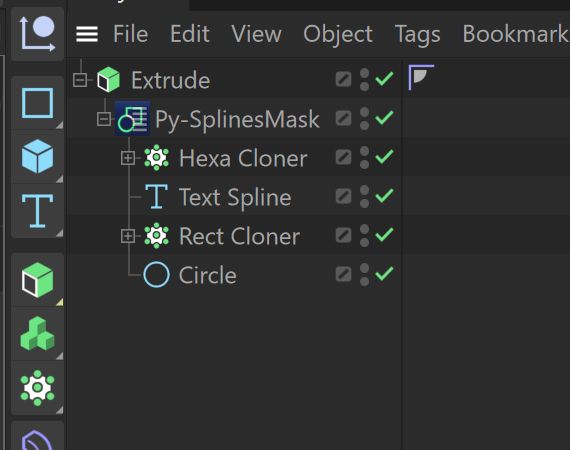
SplinesMask sits like any other generator. Drop your source splines as children, or reference them via the Splines List from anywhere in the scene.
In the example, a SplinesMask combines a Hexa Cloner, a Text Spline, a Rect Cloner and a Circle. Place the result under an Extrude (or any other spline-driven generator) and you have a procedural composite shape.
All controls in one panel
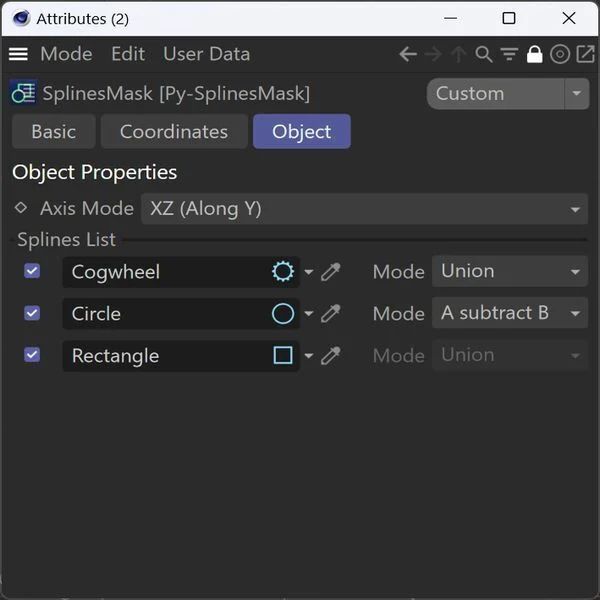
The Object tab exposes every spline in the mask as a row in a list. For each row:
- Enable checkbox — Toggle the spline on/off without removing it from the list. Useful for quick comparisons or temporary disabling.
- Spline link — Drag a spline from the Object Manager, or use the eyedropper to pick it from the viewport.
- Mode — Boolean operation applied to this spline against the cumulative result of the previous rows: Union, A subtract B, B subtract A, Intersect.
A global Axis Mode dropdown selects the working plane for all boolean computations.
Installation
Get the ZIP from the Download button above and extract it.
Move the Py-SplinesMask folder into your Cinema 4D plugins directory.
SplinesMask appears under the Generators menu, ready to use.
Plugins directory:
Windows: %APPDATA%\Maxon\<version>\plugins\
macOS: ~/Library/Preferences/Maxon/<version>/plugins/
FAQ
Does it work on macOS?
Yes — SplinesMask is pure Python with no native dependencies, so the same plugin file works on Windows and macOS.
Will it work in newer Cinema 4D versions?
Yes — written in pure Python using the standard Cinema 4D API. Tested from R20 up to Cinema 4D 2025.2. The plugin handles both the new and legacy API signatures, so it stays compatible across versions.
Can I use generators (Cloner, MoSpline...) as input?
Yes — anything that ultimately produces a spline can go into the list. Cloners, Text Splines, MoSplines, and primitive splines all work.
Does the result work with Extrude, Sweep, Loft?
Yes — SplinesMask outputs a regular spline. Place it under any spline-driven generator just like you would with Cinema 4D's stock SplineMask.
Is there a limit to the number of splines?
No artificial limit. Add as many splines as you need to the list. Performance scales with the complexity of the booleans, the same as the stock SplineMask.
Is it really free?
Yes. SplinesMask is offered free of charge. If you find it useful and want to support continued development, consider a one-time donation on Ko-fi — much appreciated, never required.
Stop nesting SplineMasks. Start using SplinesMask.
Free download, no license, works on all platforms.