
From folder to flipping book in seconds.
FlipBook
Procedural page-turn animator for Cinema 4D. Generate animated books with realistic page curl, randomization and per-page textures from a folder.
Why FlipBook
Real paper feel
Realistic curl, skew randomization, organic timing. Not just rotating planes pretending to be paper.
Folder to book in seconds
Drop your images in a folder, hit Create Mat, you're done. Pages, materials and UVs are all generated for you.
Procedural & editable
Every parameter is keyframable. Tweak curl, timing, randomization at any time. No baking, no destructive operations.
Features
Automatic page generation
Define page count and dimensions. The geometry is built and updated procedurally as you tweak.
Editable curl profile
A spline curve defines the shape of the page curl across its length. Edit it directly, save and reuse as preset.
Per-page randomization
Phase, skew and timing offsets randomize each page individually for organic, non-mechanical motion.
Folder-based texturing
Point to a folder of images, generate one material per page automatically. Filename order = page order.
Stop page
Pick a page that stays open on the right side, perfect for static camera shots framed on a specific spread.
Animation retiming
A spline curve remaps the playback timing. Ease in/out, hold pauses, distort speed across the animation.
Parameters
FlipBook exposes its controls through three tabs in the Cinema 4D Attribute Manager. Each tab groups parameters by purpose: geometry and page behaviour, animation timing, and per-page texturing.
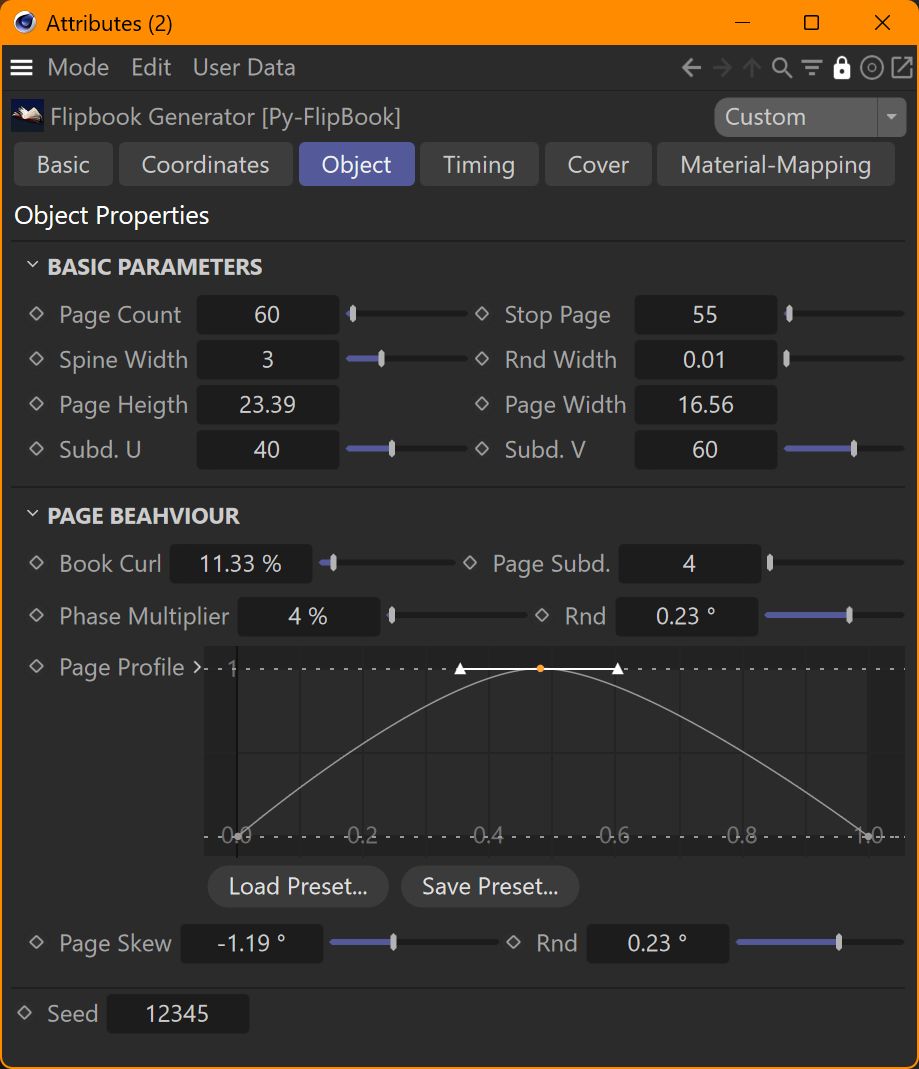
Object
The geometric structure of the book and the behaviour of its pages.
Basic Parameters
- Page Count — Total number of pages generated in the book.
- Stop Page — Index of the page that remains static on the right side, never animating. Useful for camera shots framed on a specific page: page 55 stays open on the right while page 54 sits on the left.
- Spine Width — Distance between adjacent pages — the thickness of the paper. Together with Page Count it defines the overall thickness of the closed book.
- Rnd Width — Random variation applied to each page width, in percent. Small values give pages a slightly uneven edge.
- Page Height / Width — Dimensions of each page in scene units. Match the aspect ratio of your source images to avoid stretching the textures.
- Subd. U / V — Subdivisions of the page mesh. Higher values give smoother curl deformation.
Page Behaviour
- Book Curl — Amount of curl anticipation while a page is turning. Extends the deformation range so pages start curling slightly before and after their main rotation, giving a more organic feel.
- Page Subd. — Number of intermediate sections each page is divided into for the curl computation.
- Phase Multiplier — Scales the influence of the Page Profile curve. Higher values amplify the wave shape, lower values flatten it.
- Rnd (Phase) — Random variation added to the curl phase, per page.
- Page Profile — Spline curve that defines the shape of the page curl. Edit directly, or load/save presets.
- Page Skew — Twists each page slightly along its turning axis, simulating the asymmetric bend of real paper.
- Rnd (Skew) — Random variation added to the skew, per page.
- Seed — Seed value for all randomization. Change it to get a different random pattern with the same settings.
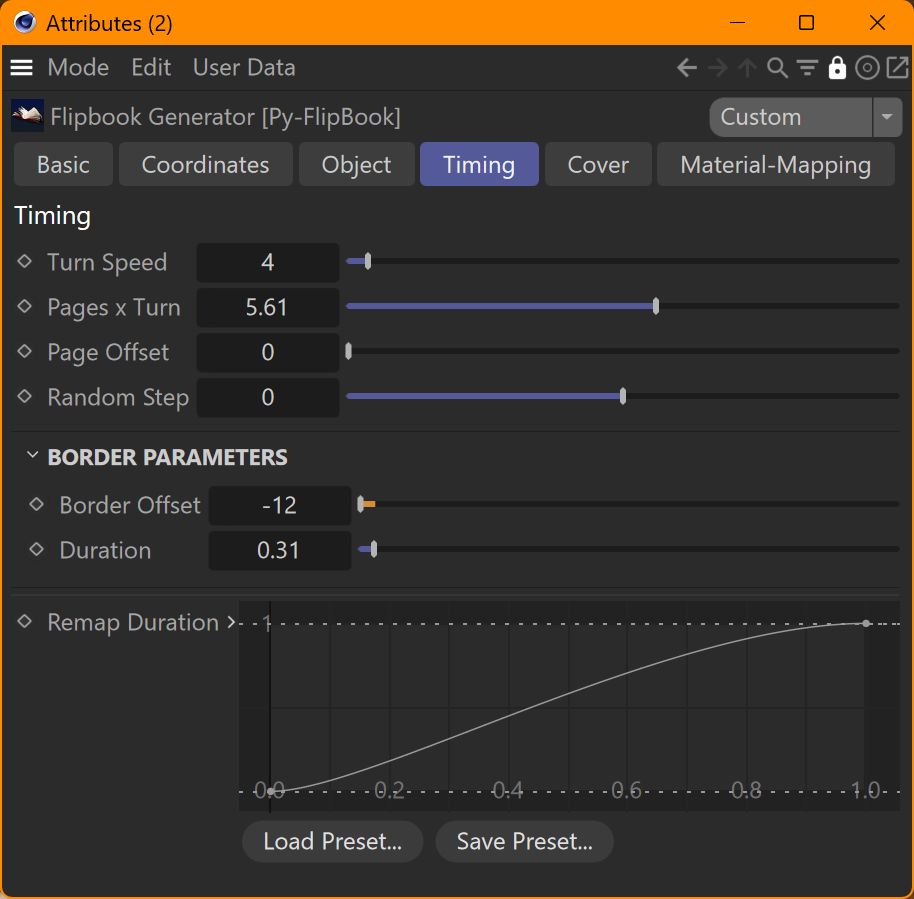
Timing
Speed and timing of the page-turn animation.
- Turn Speed — How fast each page turns.
- Pages x Turn — Number of pages turning simultaneously. With value 1, each page completes its turn before the next starts. Higher values overlap several pages in motion at once for a cascading flip effect.
- Page Offset — Time offset applied to the entire animation. Use it to shift the whole sequence forward or backward without re-keyframing.
- Random Step — Adds a random time offset to each page individually, so pages don't all turn with identical timing.
Border Parameters
Secondary rotation applied as the animation plays, simulating the natural deformation of an open book.
- Border Offset — When the border rotation starts, relative to the main animation.
- Duration — How long the border rotation takes to complete.
Remap Duration
Spline curve that remaps the playback timing. Use it to ease in/out, hold pauses, or distort the speed across the animation. Edit the curve directly, or load/save presets.
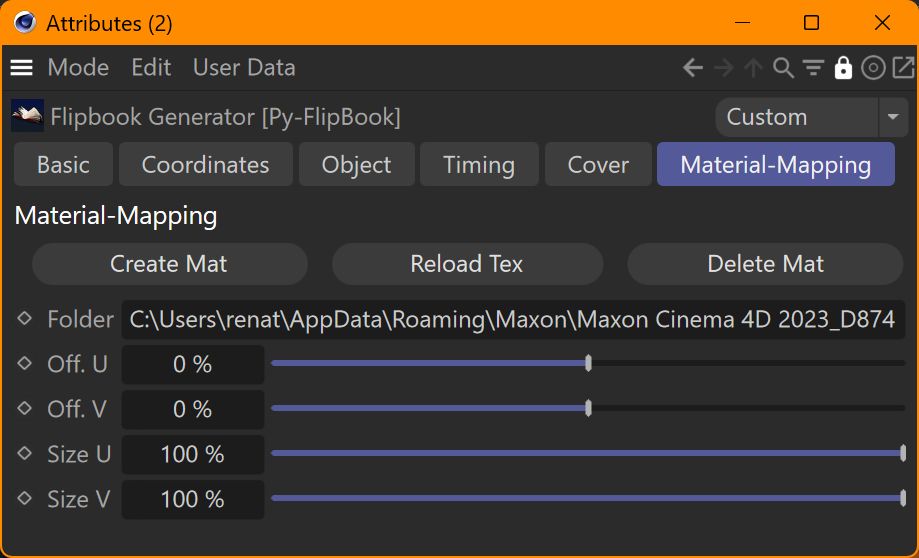
Material-Mapping
Loads textures from a folder and assigns them to the pages of the book.
Actions
- Create Mat — Reads the folder specified below and generates one material per image found. All materials are tagged in a layer named "FlipBook" so they can be reviewed and managed together. After creation, the materials are automatically distributed across the book pages.
- Delete Mat — Removes all materials previously created by the plugin (those whose name starts with FB_), cleaning up the document.
Folder
- Folder — Path to the folder containing the page images. Pages are assigned in alphabetical order, so naming images with zero-padded numbers (page_001.jpg, page_002.jpg, ...) ensures the correct sequence.
UV Mapping
- Off. U / V — Texture offset on each page.
- Size U / V — Texture scale. 100% fits the texture to the full page.
Installation
Get the ZIP from the Download button above and extract it.
Move the Py-FlipBook folder into your Cinema 4D plugins directory.
FlipBook appears under the Generators menu, ready to use.
Plugins directory:
Windows: %APPDATA%\Maxon\<version>\plugins\
macOS: ~/Library/Preferences/Maxon/<version>/plugins/
Companion tool: PDF to Pages
FlipBook reads pages from a folder of images. To turn a PDF (a comic book, a manual, an illustrated novel) into ready-to-use page images, a small Python utility is included.
pdf_to_pages.py — a standalone script with a simple GUI that exports any PDF as numbered JPG pages, ready to drop into FlipBook.
Requires Python 3 and PyMuPDF (pip install pymupdf).
FAQ
Does it work on macOS?
It should — FlipBook is pure Python with no native dependencies. Mac compatibility is being tested in the beta phase. If you hit any issue on Mac, please get in touch.
Will it work in newer Cinema 4D versions?
Yes — written in pure Python with the standard Cinema 4D Python API. Tested on R20 and up to recent releases.
Will FlipBook work with Redshift, Octane, or Arnold?
FlipBook creates standard Cinema 4D materials. Whether your renderer of choice will use them directly or require conversion depends on the renderer itself. If you have a specific workflow tip or compatibility report, please get in touch — I'll add it here.
Can I customize the animation curves?
Yes — both the page profile (curl shape) and the timing remap are editable splines. You can save and load presets to reuse across projects.
What happens at the end of the beta?
When the commercial version launches, beta testers can keep the beta release as-is at no cost. If you'd like to upgrade to the full commercial version, you'll get a 50% discount as a thank-you for helping test.
Ready to animate your first book?
Download the free beta and try it on your next project.